


-

Amazon 1
-

About Aura Displays 6
-

Marketing 6
-

My Account 12
-

General terms and conditions 6
-

My Order(s) 18
-

B2B / Sales / Bulk Orders 9
-

Shipping 9
-

Products 3
-
Triple Boost 14" Pro 23
-
Triple Aero 15.6" Pro Max 20
-
Triple Go (Gen 2) 19
-
Dual Play (Gen 2) 18
-
Dual Boost Pro (Gen 3) 23
-
Dual Boost 15.6" Pro Max (Gen 3) 24
-
Single Boost 15.6" (Gen 2) 18
-
Single Play (Gen 2) 18
-
-

Returns 6
Can I use my portable monitor with my iPhone or iPad?


Can I use my portable monitor with my iPhone or iPad?
Yes — AURA portable monitors are compatible with iOS devices, including iPhones and iPads. However, the type of connection depends on the model of your device.
For iPads with USB-C ports (e.g., iPad Pro, iPad Air 4th gen and newer)
- You can connect directly to the monitor using a USB-C to USB-C cable.
- No additional adapters are required — just plug and play.
For iPhones and iPads with a Lightning port
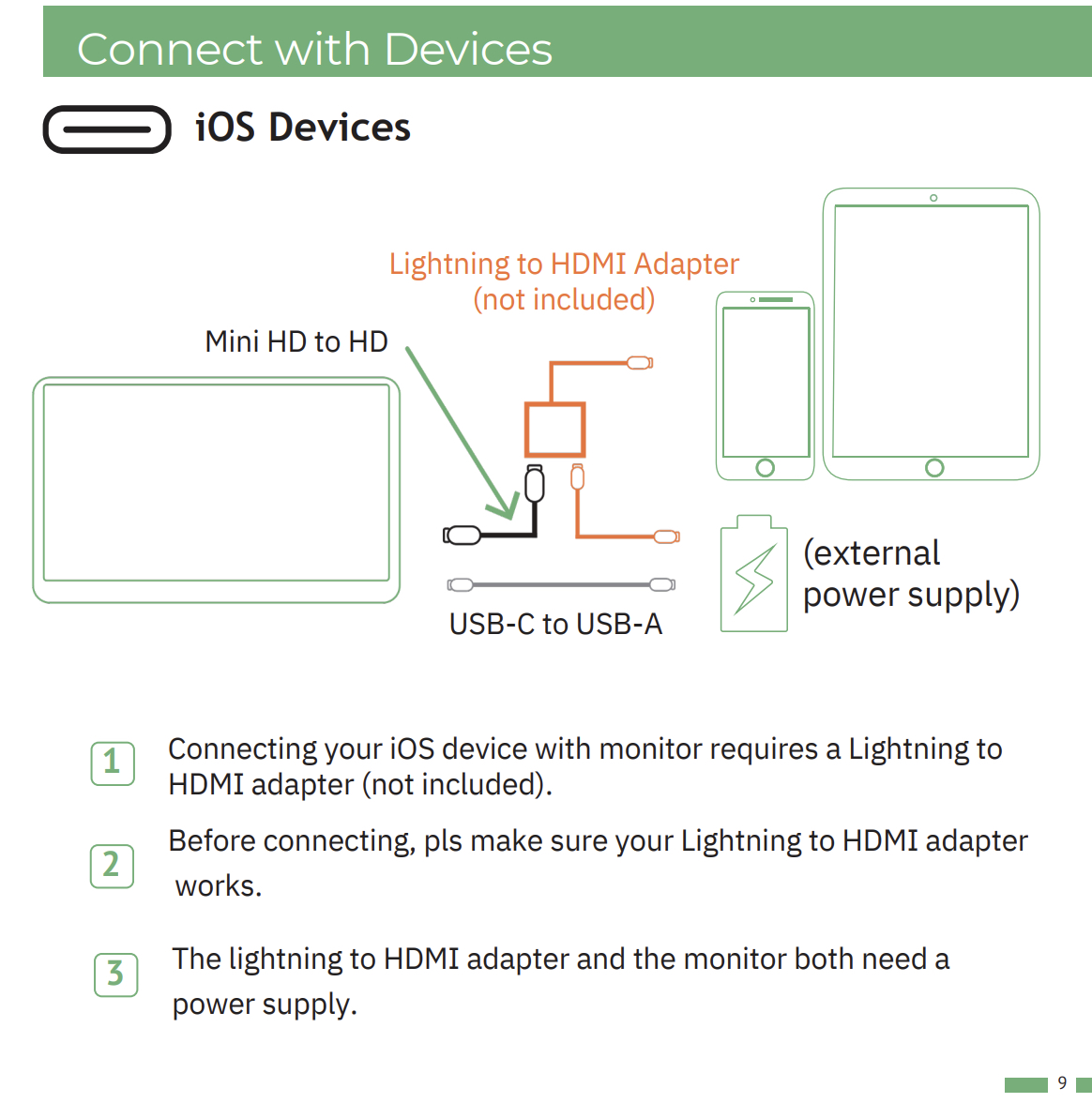
- You’ll need a Lightning to HDMI adapter (not included).
- Connect the adapter to your device, then use an HDMI to Mini HDMI cable to link the adapter to your portable monitor.
- Both the adapter and the monitor must be powered — use the included USB-C to USB-A cable with a standard power adapter or power bank.
Important reminders
- Ensure your Lightning to HDMI adapter is Apple-certified or high-quality — not all third-party adapters are reliable.
- For iPhone users, a Lightning to HDMI adapter is mandatory and is not included with the monitor.
- Power is required on both ends (adapter and monitor) for the setup to work properly.
- Audio will typically play from your iOS device, as most HDMI adapters do not transmit audio to external monitors.
Need visual help? Refer to the diagram above or visit our Technical Specifications page for more details.


esc